> ## Documentation Index
> Fetch the complete documentation index at: https://platform.stepfun.ai/docs/llms.txt
> Use this file to discover all available pages before exploring further.
# Video understanding best practices
Stepfun's `step-3.7-flash` model supports video understanding. Pass a video link in the conversation context and the model will read the video, answer questions about it, or use it for generation.
> Video uploads support three forms: a directly accessible video URL, inline Base64 (`data:video/mp4;base64,...`), or a `stepfile://` reference after uploading via the [Files API](/en/api-reference/files/create). Supported container formats are MP4, QuickTime, and Matroska.
## Using step-3.7-flash
`step-3.7-flash` natively supports multimodal input. Use the [Chat API](/en/api-reference/chat/chat-completion-create) and include a `video_url` item along with your prompt in the `user` message—the model will read the video and generate based on its content.
```bash theme={null}
curl --location 'https://api.stepfun.ai/v1/chat/completions' \
--header 'Content-Type: application/json' \
--header "Authorization: Bearer $STEP_API_KEY" \
--data '{
"model": "step-3.7-flash",
"messages": [
{
"role": "user",
"content": [
{
"type": "video_url",
"video_url": {
"url": "https://static-openapi.stepfun.com/static/platform-web/vipcase/case1.mp4"
}
},
{
"type": "text",
"text": "Summarize the main points of this video and extract the key information."
}
]
}
]
}'
```
For full field references, Base64 / Files API usage, and reasoning effort control, see the [Step 3.7 Flash quickstart](/en/guides/models/step-3.7-flash-quickstart). For pricing, see [pricing details](/en/guides/pricing/details).
## Notes
* Place the video before the instruction in the message to improve results.
* Downloading and safety checks take time. Design UI feedback so users know the request is in progress.
* `step-3.7-flash` currently supports a single MP4 video under 128MB. For larger or other formats, split the video into sub-128MB MP4s with [ffmpeg](https://www.ffmpeg.org/).
* Because the server downloads your video, network speed affects latency. Host videos on fast, publicly accessible storage (e.g., object storage with CDN).
## FAQ
### Speed up video understanding with the Files API
If you pass an external URL, Stepfun must fetch it, so download speed affects generation time. Host the video on CDN or high-bandwidth storage for faster downloads. If you reuse the same video (e.g., for few-shot), upload it via the Files API with `purpose=storage` to avoid repeated downloads and bandwidth costs.
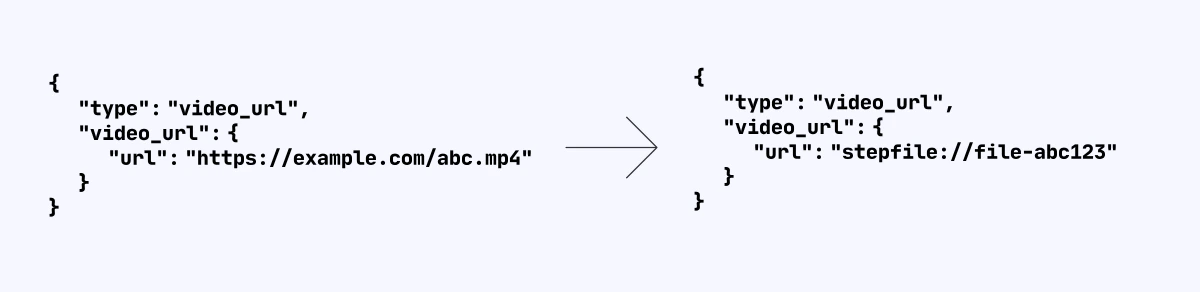 Call the [file upload](/en/api-reference/files/create) API with **purpose=storage**. Once the upload completes, you'll get a File ID. Prefix it with `stepfile://` when referencing it in chat messages so the model knows to fetch the video from Stepfun file storage, reducing download time and improving overall latency.
## ffmpeg slicing tips
### Split a video file
If a file exceeds 128MB, split it into multiple clips and summarize each clip for context, so you can discuss the full video. Example: split `sample.mp4` into 120-second segments.
```bash theme={null}
ffmpeg -i sample.mp4 -acodec copy -f segment -segment_time 120 -vcodec copy -reset_timestamps 1 output_%d.mp4
```
### Convert to MP4
Convert other formats to MP4 before sending. Example: convert `sample.mkv` to `sample.mp4`:
```bash theme={null}
ffmpeg -i sample.mkv -codec copy sample.mp4
```
Call the [file upload](/en/api-reference/files/create) API with **purpose=storage**. Once the upload completes, you'll get a File ID. Prefix it with `stepfile://` when referencing it in chat messages so the model knows to fetch the video from Stepfun file storage, reducing download time and improving overall latency.
## ffmpeg slicing tips
### Split a video file
If a file exceeds 128MB, split it into multiple clips and summarize each clip for context, so you can discuss the full video. Example: split `sample.mp4` into 120-second segments.
```bash theme={null}
ffmpeg -i sample.mp4 -acodec copy -f segment -segment_time 120 -vcodec copy -reset_timestamps 1 output_%d.mp4
```
### Convert to MP4
Convert other formats to MP4 before sending. Example: convert `sample.mkv` to `sample.mp4`:
```bash theme={null}
ffmpeg -i sample.mkv -codec copy sample.mp4
```