Streaming Text-to-Speech
This API allows you to generate audio using our Streaming Text-to-Speech (TTS) model.
Request Method
WebSocket
Endpoint
wss://api.stepfun.ai/v1/realtime/audio
Request Headers
Authorizationstringrequired
The API key used for authentication. Its value should be:Bearer STEP_API_KEY.
Request Body
modelstringrequired
The name of the model to use. Currently, onlystep-tts-2is supported.
Call Instructions
To generate audio in streaming mode, you must send the corresponding Client Event after the WebSocket connection is successfully established. The server will then return the corresponding Server Event, through which the audio is generated.
If there is no activity for 60 consecutive seconds, the system will automatically close the connection.
Client Event & Server Event Mapping
A detailed description can be found in the explanation below.
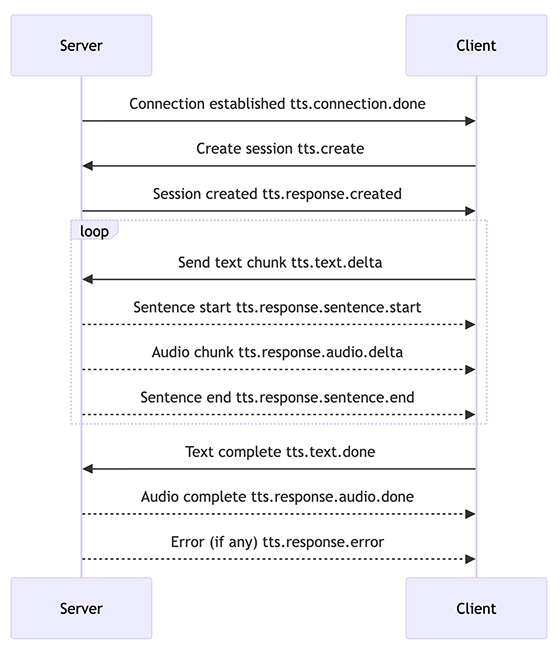
| Message Type | Client Event | Server Event | Description |
|---|---|---|---|
| Connection Established | - | tts.connection.done | Sent by the server after the WebSocket connection is successfully established. |
| Create Session | tts.create | tts.response.created | Creates a new session. After receiving this response, the client may proceed with generation. |
| Sentence Start | - | tts.response.sentence.start | Triggered when accumulated text meets the generation threshold and sentence generation begins. |
| Send Text | tts.text.delta | tts.response.audio.delta | Sends text increments. The corresponding audio delta is returned and can be played immediately. |
| Sentence End | - | tts.response.sentence.end | Triggered when accumulated text meets the end-of-sentence condition. |
| Flush Buffer | tts.text.flush | tts.text.flushed | Quickly clears the buffer and returns all remaining audio that has not yet been sent. |
| Text Done | tts.text.done | tts.response.audio.done | Marks the end of this generation task. No further audio will be produced, and the server will release the connection. |
| Audio Error | - | tts.response.error | Returned when audio generation encounters an error. |
Client Event Details
Create Session tts.create
The event used to create a new session. After the WebSocket connection is established and the tts.connection.done Server Event is received, the client should send this event to initiate audio generation.
typestringrequired
Must be set totts.create.dataobjectrequired
Event payload.session_idstringrequired
The session ID used to identify which conversation the request belongs to. Returned by thetts.connection.doneServer Event.voice_idstringrequired
The ID of the voice to use. Refer to the System Voice ID List for supported voices and samples.response_formatstringoptional
The audio format. Supported values are:wav,mp3,flac,opus,pcm. Defaults tomp3.sample_rateintoptional
The sampling rate of the output audio. Supported values:8000,16000,22050,24000. Default:24000.pronunciation_mapobject arrayoptional
Defines a pronunciation rule to annotate or override the reading of specific characters or symbols. In Chinese text, tones are represented by numbers: 1 for the first tone, 2 for the second tone, 3 for the third tone, 4 for the fourth tone, and 5 for the neutral tone.tonestringrequired
Specific pronunciation mapping rules, separated by/. Example:["omg/oh my god"].
speed_ratiofloatoptional
The speaking rate. Valid range: 0.5 to 2.0. Default: 1.0.volume_ratiofloatoptional
The volume level. Valid range: 0.1 to 2.0. Default: 1.0.modestringoptional
The generation mode. Supported values:default(character-level generation, suitable for LLM real-time streaming scenarios) andsentence(sentence-level generation, suitable when full sentences are already prepared). Default:default.voice_labelobjectoptional
Voice tags. Required when using a custom voice. Only one of the following fields can be set at a time:language,emotion, orstyle.languagestringoptional
The language tag. Supported values:Cantonese,Sichuanese,Japanese. If not specified, the system will automatically determine whether the input text is English or Chinese.emotionstringoptional
Emotion tag. Supports up to 11 options such asHappy,Angry, etc. Supported values may vary by model.stylestringoptional
Speaking or delivery style. Supports up to 17 styles. Supported values may vary by model.
Default mode is designed for scenarios where TTS is used together with a large language model. In this mode, the system automatically buffers and segments sentences. Therefore, it does not return audio immediately; generation begins only when the accumulated input forms a complete sentence. If you need to force an immediate return, you can send tts.text.flush, and the model will promptly return the available audio.
Sentence mode is suitable for scenarios where the full text is already available. In this mode, the system automatically segments the text based on punctuation marks such as . ! ? and generates audio accordingly.
Example:
{
  "type": "tts.create",
  "data": {
    "session_id": "01956e7388477cfcbdc3aaabf364bc70",
    "voice_id": "lively-girl",
    "response_format": "wav",
    "volume_ratio": 1.0,
    "speed_ratio": 1.0,
    "sample_rate": 16000,
    "pronunciation_map": {
      "tone": [
        "LOL/laugh out loudly"
      ]
    }
  }
}
Generate Audio tts.text.delta
Client Event used to generate audio. During generation, if the TTS engine determines that the conditions for audio generation have been met, it returns a tts.response.sentence.start event to indicate that inference has begun. It then returns one or more tts.response.audio.delta events containing the audio data. After all audio for the sentence has been sent, the engine returns a tts.response.sentence.end event to indicate that the sentence has finished generating.
If the TTS engine determines that the conditions have not been met, no events will be returned.
typestringrequired
Must be set totts.text.delta.dataobjectrequired
Event payload.session_idstringrequired
The session ID used to identify which conversation the request belongs to. Returned by thetts.connection.doneServer Event.textstringrequired
The text to be synthesized. The maximum length is 10,000 characters.
Example:
{
  "type": "tts.text.delta",
  "data": {
    "session_id": "01956e7388477cfcbdc3aaabf364bc70",
    "text": "The weather is great today, and I want to learn StepFun large model technologies."
  }
}
Flush Buffer tts.text.flush
Forces the TTS engine to return all audio generated so far by clearing the internal buffer.
typestringrequired
Must be set totts.text.flush.dataobjectrequired
Event payload.session_idstringrequired
The session ID used to identify which conversation the request belongs to. Returned by thetts.connection.doneServer Event.
Example:
{
  "type": "tts.text.flush",
  "data": {
    "session_id": "01956e8dc1d77bb98f9da8d1b642fcf0"
  }
}
Finish Audio Generation tts.text.done
Complete Audio Generation.
typestringrequired
Must be set totts.text.done.dataobjectrequired
Event payload.session_idstringrequired
The session ID used to identify which conversation the request belongs to. Returned by thetts.connection.doneServer Event.
Example:
{
  "type": "tts.text.done",
  "data": {
    "session_id": "01956e8dc1d77bb98f9da8d1b642fcf0"
  }
}
Server Event Details
Connection Established tts.connection.done
Indicates that the WebSocket connection has been successfully established.
event_idstringrequired
The unique ID of this event. When contacting support, providing this ID helps with troubleshooting.typestringrequired
Must be set totts.connection.done.dataobjectrequired
Event payload.session_idstringrequired
The session ID that must be included in subsequent requests.
Example:
{
  "event_id": "01956e73888c7953896a6e176bf3d760",
  "type": "tts.connection.done",
  "data": {
    "session_id": "01956e7388477cfcbdc3aaabf364bc70"
  }
}
Session Created tts.response.created
Indicates that the session has been successfully created.
event_idstringrequired
The unique ID of this event. When contacting support, providing this ID helps with troubleshooting.typestringrequired
Must be set totts.response.created.dataobjectrequired
Event payload.session_idstringrequired
The session ID that must be included in subsequent requests.
Example:
{
  "event_id": "01956e73888c7953896a6e176bf3d760",
  "type": "tts.response.created",
  "data": {
    "session_id": "01956e7388477cfcbdc3aaabf364bc70"
  }
}
Sentence Start tts.response.sentence.start
Indicates that the TTS engine has begun generating a new sentence.
event_idstringrequired
The unique ID of this event. When contacting support, providing this ID helps with troubleshooting.typestringrequired
Must be set totts.response.sentence.start.dataobjectrequired
Event payload.session_idstringrequired
The session ID for the current conversation.textstringrequired
The text content being generated in this sentence.started_atstringrequired
The timestamp indicating when sentence generation started.
Example:
{
  "event_id": "01956e73888c7953896a6e176bf3d760",
  "type": "tts.response.sentence.start",
  "data": {
    "session_id": "01956e7388477cfcbdc3aaabf364bc70",
    "text": "blah blah",
    "started_at": 10292929292
  }
}
Receive Generated Audio tts.response.audio.delta
Indicates that the server is returning a chunk of generated audio.
event_idstringrequired
The unique identifier of this event. When contacting support, providing this ID helps with troubleshooting.typestringrequired
Must be set totts.response.audio.delta.dataobjectrequired
Event payload.session_idstringrequired
The session ID must be used in subsequent requests.statusstringrequired
The generation status. Supported values areunfinishedandfinished.audiostringrequired
The Base64-encoded audio data.durationfloatrequired
The duration of this audio chunk, in seconds.
Example:
{
  "event_id": "42bd707a-ba16-4ddb-a751-54d84301b474",
  "type": "tts.response.audio.delta",
  "data": {
    "session_id": "01956e8dc1d77bb98f9da8d1b642fcf0",
    "status": "unfinished",
    "audio": "BASE64 audio data",
    "duration": 2.043375
  }
}
Sentence End tts.response.sentence.end
Indicates that the TTS engine has finished generating a sentence.
event_idstringrequired
The unique identifier of this event. When contacting support, providing this ID helps with troubleshooting.typestringrequired
Must be set totts.response.sentence.end.dataobjectrequired
Event payload.session_idstringrequired
The session ID.textstringrequired
The text content generated for this sentence.ended_atstringrequired
The timestamp indicating when the generation of this sentence ended.
Example:
{
  "event_id": "01956e73888c7953896a6e176bf3d760",
  "type": "tts.response.sentence.end",
  "data": {
    "session_id": "01956e7388477cfcbdc3aaabf364bc70",
    "text": "blah blah",
    "ended_at": 10292929292
  }
}
Flush Start tts.text.flushed
Indicates that the system has received the flush command and has begun clearing the buffer.
event_idstringrequired
The unique identifier of this event. When contacting support, providing this ID helps with troubleshooting.typestringrequired
Must be set totts.text.flushed.dataobjectrequired
Event payload.session_idstringrequired
The session ID that must be included in subsequent requests.
Example:
{
  "event_id": "01956e8ee1b9788c95d5981b1cfdbf12",
  "type": "tts.text.flushed",
  "data": {
    "session_id": "01956e8dc1d77bb98f9da8d1b642fcf0"
  }
}
Generation Completed tts.response.audio.done
Indicates that the audio generation task has been completed. After receiving this event, the connection will automatically close. Additionally, if the connection remains idle for more than 60 seconds, the system will also complete the generation and close the connection.
event_idstringrequired
The unique identifier of this event. When contacting support, providing this ID helps with troubleshooting.typestringrequired
Must be set totts.response.audio.done.dataobjectrequired
Event payload.session_idstringrequired
The session ID that must be included in subsequent requests.audiostringrequired
The Base64-encoded audio data, containing all audio content generated in this session.
Example:
{
  "event_id": "01956e8bf5067d6499cdfa0dad34f805",
  "type": "tts.response.audio.done",
  "data": {
    "session_id": "01956e7388477cfcbdc3aaabf364bc70",
    "audio": ""
  }
}
Error Event tts.response.error
Indicates that an error occurred during audio generation.
{
  "event_id": "01956e8fdb157619a852bdf38028db45",
  "type": "tts.response.error",
  "data": {
    "session_id": "01956e8dc1d77bb98f9da8d1b642fcf0",
    "code": "503",
    "message": "The engine is currently overloaded, please try again later",
    "details": {
      "error": "The engine is currently overloaded, please try again later"
    }
  }
}
Code Example
First, run pip install websocket-client, and then execute the following code.
import websocket
import rel
import json

headers = {
  "Authorization": "Bearer STEP_API_KEY"
}

def get_start_event(sid):
  return json.dumps(
      {
          "type": "tts.create",
          "data": {
              "session_id": sid,
              "voice_id": "lively-girl",
              "response_format": "wav",
              "volume_ratio": 1.0,
              "speed_ratio": 1.0,
              "sample_rate": 16000
          },
      }
  )

def on_message(ws, message):
  data = json.loads(message)
  session_id = data["data"]["session_id"]
  event_type = data["type"]

  if event_type == "tts.connection.done":
      start_event = get_start_event(session_id)
      ws.send(start_event)

  print(message)

def on_error(ws, error):
  print(error)

if __name__ == "__main__":
  websocket.enableTrace(True)
  ws = websocket.WebSocketApp(
      "wss://api.stepfun.ai/v1/realtime/audio?model=step-tts-2",
      header=headers,
      on_message=on_message,
      on_error=on_error,
  )

  ws.run_forever(
      dispatcher=rel,
      reconnect=5
  )
  rel.signal(2, rel.abort)
  rel.dispatch()
const WebSocket = require('ws');
const url = 'wss://api.stepfun.ai/v1/realtime/audio?model=step-tts-2';
const headers = {
Authorization: 'Bearer STEP_API_KEY',
'Content-Type': 'application/json',
};
const ws = new WebSocket(url, {
headers: headers
});
ws.on('open', () => {
console.log('Connection established');
});
ws.on('message', (message) => {
console.log(`Message received: ${message}`);
const event = JSON.parse(message);
const session_id = event.data.session_id;
const event_type = event.type;
if (event_type === 'tts.connection.done') {
ws.send(JSON.stringify({
type: 'tts.create',
data: {
session_id: session_id,
voice_id: 'lively-girl',
response_format: 'wav',
volume_ratio: 1.0,
speed_ratio: 1.0,
sample_rate: 16000
}
}));
}
});
ws.on('error', (error) => {
console.error(`Error occurred: ${error}`);
});
ws.on('close', (code, reason) => {
console.log(`Connection closed, code: ${code}, reason: ${reason}`);
});